
|
REW or OSM for speaker measurements |
Post Reply 
|
| Author | |||
liamsanft 
New Member 
Joined: 27 July 2025 Status: Offline Points: 2 |
 Post Options Post Options
 Thanks(0) Thanks(0)
 Quote Reply Quote Reply
 Topic: REW or OSM for speaker measurements Topic: REW or OSM for speaker measurementsPosted: 27 July 2025 at 11:26am |
||
|
Hey everyone! We've got a 3-way sound system with self-built subs and we're looking to create some presets for our speakers. Up until now, we've been using Open Sound Meter for our measurements, but I've recently come across some discussions suggesting that Room EQ Wizard might be better suited for this type of work. Could someone break down the pros and cons of both software options for speaker tuning and preset creation? I'd really appreciate any recommendations on which direction we should go. Thanks in advance for your help! |
|||
 |
|||
|
Xoc1
Registered User 
Joined: 15 October 2012 Location: Devon UK Status: Offline Points: 485 |
Post Options
Thanks(0)
Quote Reply
Posted: 27 July 2025 at 8:07pm |
||
|
I have been using REW recently. I have not tried OSM. I can't see any reference in the OSM oveview to any Impedance measurements. If you have self built speakers I would concider impedance measurements as essential!
|
|||
|
|||
|
fudge22
Registered User
Joined: 26 July 2022 Location: UK Status: Offline Points: 263 |
Post Options
Thanks(0)
Quote Reply
Posted: 31 July 2025 at 8:57pm |
||
|
For just setting up presets on a digital crossover, OSM is probably simpler. REW has more features but is less straight forward to use. As both are free, if you have the time, it is easy enough to try both of them and see which you prefer.
The significant part of your statement is that there is no reference to impedance measurement. It can be done exactly the same way as it is done in in REW by putting a resistor in series with the loudspeaker. Unless you are designing passive crossovers, I would not consider knowing the impedance plot as essential. I believe ARTA (Audio Real Time Analysis) is now free as well. Xoc1 will be pleased to know that LIMP is also available from the same developers, it is designed for measuring resistance, capacitance and inductance. |
|||
|
|||
|
Xoc1
Registered User
Joined: 15 October 2012 Location: Devon UK Status: Offline Points: 485 |
Post Options
Thanks(0)
Quote Reply
Posted: 31 July 2025 at 9:22pm |
||
|
I use impedance sweeps for tuning bass ports. I often find that the port needs a bit of tweaking to get right. Also useful for checking the tuning on tapped horns!
|
|||
|
|||
|
fudge22
Registered User
Joined: 26 July 2022 Location: UK Status: Offline Points: 263 |
Post Options
Thanks(0)
Quote Reply
Posted: 31 July 2025 at 9:51pm |
||
Just place the measurement microphone at the port exit. You get the tuning frequency directly. If you really want the hassle, you can use a signal generator and multimeter to plot the impedance. |
|||
|
|||
|
Xoc1
Registered User
Joined: 15 October 2012 Location: Devon UK Status: Offline Points: 485 |
Post Options
Thanks(0)
Quote Reply
Posted: 01 August 2025 at 11:18pm |
||
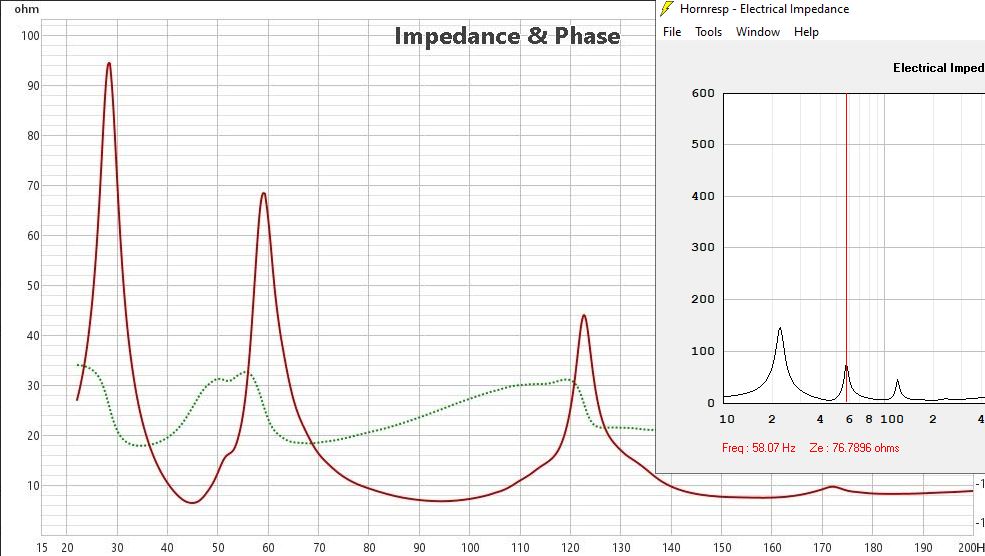 Once set up & calbrated an impedance measurement on REW is quick & easy - No hassle. Measurement is a tapped horn compared to its Hornresp sim.
|
|||
|
|||
|
Jan-2T
Registered User

Joined: 18 October 2024 Location: Belgium Status: Offline Points: 137 |
Post Options
Thanks(0)
Quote Reply
Posted: 02 August 2025 at 12:11am |
||
|
What kind of hardware did you use for this measurement? Just curious about the minimum that's needed, I found this, is it really that simple? Edited by Jan-2T - 02 August 2025 at 12:14am |
|||
|
Music!
|
|||
|
|||
|
snowflake
Old Croc 
Joined: 29 December 2004 Location: Bristol Status: Offline Points: 3443 |
Post Options
Thanks(0)
Quote Reply
Posted: 02 August 2025 at 9:21am |
||
|
it is that simple. this box does it all for you:
TZT J-BOX III Audio Speaker Tester Frequency Response Impedance Measuring Box Kit Support for justMLS REW - AliExpress 44 |
|||
|
|||
|
Xoc1
Registered User
Joined: 15 October 2012 Location: Devon UK Status: Offline Points: 485 |
Post Options
Thanks(0)
Quote Reply
Posted: 02 August 2025 at 10:26pm |
||
|
To use REW for impedance measurement the Help file is here I used an USB soundcard MOTU Microbook II because that's what I have handy & has a reasonable headphone output. For accuracy I did a loop calbibration on the soundcard. Measured the R sense resistor (100R), Made up a lead to a speakon, and a shorted link & reference resistor 15R on speakon sockets to do the calibration. Once the setup procedure is done, measurements are quick & easy, so its no bother to take another. The measurements are at a low level so I found a bit of a bodge up on the port panel sealed with tape allowed me to get the tuning I was after, & then glue & screw afterwards.
|
|||
|
|||
|
fudge22
Registered User
Joined: 26 July 2022 Location: UK Status: Offline Points: 263 |
Post Options
Thanks(0)
Quote Reply
Posted: 03 August 2025 at 11:45am |
||
This is the original post. Nowhere does it ask how to measure the impedance plot. Nor does the advice he is requesting require the need to measure the impedance plot; however easy it is to do. To be clear. For anyone who wants to measure impedance, whether to confirm that hornresp dose a reasonably good job at predicting the correct response, they think it is a more clever way of checking the tuning frequency of a reflex port, or simply because they like cute response plots of their devices, go for it. I built my first reflex loudspeaker 50 years ago. Back then measuring the impedance plot, using a signal generator and oscilloscope, was the only practical method of checking the tuning of the port. I am aware of its capabilities.
Yes it is that simple. It is basic ohms law. If you have two resistors in series, the current is the same in both of them. If you know the value of one of the resistors, you can determine the value of the other one by comparing the voltage across each one.
Again, in the context of the thread’s original question, my advice would be to wait until the 50% discount is removed, then when you don’t buy it you save twice as much money. |
|||
|
|||
|
Xoc1
Registered User
Joined: 15 October 2012 Location: Devon UK Status: Offline Points: 485 |
Post Options
Thanks(1)
Quote Reply
Posted: 03 August 2025 at 10:26pm |
||
|
The OP (who is nowhere to be seen) stated 'self-built subs and we're looking to create some presets for our speakers' If you self build my advice would be to check the tuning. I use Hornresp for more than ' cute response plots'. I'm fairly confident that is the case & that a fair number of people around the planet appreciate that! The sim I showed is delivering over 3KW transients in the minimum impedances, So confirming the Hornresp parameters are real world correct helps with setttings that are not that easy to measure for DIY users but can be simulated. Optimising High pass filters on the subs for instance. |
|||
|
|||
|
fudge22
Registered User
Joined: 26 July 2022 Location: UK Status: Offline Points: 263 |
Post Options
Thanks(0)
Quote Reply
Posted: 05 August 2025 at 10:22pm |
||
OP only wanted to know if REW was better than OSM. Anyway, for the benefit of any self-builder, already using Open Sound Meter (or similar), and therefore assuming that they already have a measurement microphone and an interface to connect it it to the computer. If they want to check the tuning of a reflex cabinet, here are 3 options which all work. Take your pick. 1. Obtain a couple of low inductance, high power, resistors, some cable, and a few connectors, from which you construct an interface which needs calibrating, so that you can measure the impedance from which you determine the resonant frequency. 2. Buy another usb interface as suggested by Jan-2T (discount cost £96.99) which incorporates the resistor and small amplifier, to save making the above interface. Except it uses banana terminals thus requiring a custom lead to connect the loudspeaker anyway. Measure the impedance… etc. etc. 3. Set up the measuring system in the normal way, move the measuring microphone close to the port exit and measure the tuning frequency directly. |
|||
|
|||
|
Post Reply
|
|
| Tweet |
| Forum Jump | Forum Permissions You cannot post new topics in this forum You cannot reply to topics in this forum You cannot delete your posts in this forum You cannot edit your posts in this forum You cannot create polls in this forum You cannot vote in polls in this forum |


 Topic Options
 I can't see any reference in the OSM oveview to any Impedance measurements.