
|
MC2 T Series Fan Question |
Post Reply 
|
Page 12> |
| Author | |
celo 
New Member 
Joined: 21 January 2025 Status: Offline Points: 3 |
 Post Options Post Options
 Thanks(0) Thanks(0)
 Quote Reply Quote Reply
 Topic: MC2 T Series Fan Question Topic: MC2 T Series Fan QuestionPosted: 21 January 2025 at 7:09pm |
|
So, I have read on Audiogon someone mentioning the MC2 amps for home use. Come to find out they are pro amps. I got curious and bought a used T1500.
I was so surprised! An amazing sounding amp. So balanced, highs, mids, even bass were so good. THOUGH, the LOUD fans threw me off. So reading more, I have found out that the T1000 does not have permanent two fans like the T1500. The rear fan can be set to kick in only if the temperature goes above 90C. So, I am buying a T1000 and will change the fans with ultra quiet fans and set the rear to where it is not always on. I talked to MC2 and they recommended this: https://mitxpc.com/productsb-x-2 - https://mitxpc.com/products/nb-x-2
But I want to buy something that is more quiet which means usually less RPM but then I may risk the amp with heat. Does anyone have any real world experience with a specific fan with T1000 or at least MC2 amps with replaced fans? Noctua is out of the question because I was told by MC2, it is risky to use them since they have some metal parts and if it touches the heatsink, it will short and kill the amp. For example, would this be fine? https://mitxpc.com/productsb-m8-1 - https://mitxpc.com/products/nb-m8-1
|
|
 |
|
|
BrainlessTekno
Registered User 

Joined: 20 February 2023 Location: Slovakia Status: Offline Points: 381 |
Post Options
Thanks(0)
Quote Reply
Posted: 22 January 2025 at 8:22am |
|
If you can still hear the fans when the system is playing I would consider changing the placement of the amp, fp10000q i own is fairly loud but i strategicly place amps behind the system and cant hear them even when playing quietly
|
|
|
BarSick / barsik soundsystem
Dont want to toot my own horn but toot toot |
|
|
|
|
Jan-2T
Registered User

Joined: 18 October 2024 Location: Belgium Status: Offline Points: 137 |
Post Options
Thanks(0)
Quote Reply
Posted: 22 January 2025 at 10:36am |
|
The fan you mention delivers far less airflow (cfm or ft3/M = cubic feet / per minute)
some manufacturers mention cubic meters per hour or liters, just convert it in google. I would not use a fan with less flow than the original. If you have the space for a thicker fan, they typicaly deliver more air and mean this can spin slower for the same flow output. I don't know if this will reduce the fan's sound level though... Good luck, and keep it all in one piece
 |
|
|
Music!
|
|
|
|
|
celo
New Member
Joined: 21 January 2025 Status: Offline Points: 3 |
Post Options
Thanks(0)
Quote Reply
Posted: 22 January 2025 at 8:45pm |
|
I wonder if this would be sufficient?
I was told Noctua is risky because it has metal parts but I see no metal with this model. 1200rpm Fan speed
9.1 dBA Noise level 21.07 CFM Airflow (35,8 m³/h) https://noctua.at/en/nf-r8- 1800rpm Fan speed 18.2 dBA Noise level 26.49 CFM Airflow (45.01 m³/h) https://mitxpc.com/products/ Edited by celo - 22 January 2025 at 8:50pm |
|
|
|
|
kedwardsleisure
Old Croc 
Joined: 20 January 2009 Location: Staffordshire Status: Offline Points: 5157 |
Post Options
Thanks(0)
Quote Reply
Posted: 22 January 2025 at 11:29pm |
|
I'm going to say that most of the noise from a fan is the airflow so if it isn't making the noise, it isn't producing the airflow.
Some fan motors whine or whistle in a characteristic way but there are plenty that don't. If you want a silent amp then you need one with a big naturally ventilated heatsink in a big 3u case aimed at studios. |
|
|
Kevin
North Staffordshire |
|
|
|
|
jblfreak
Registered User
Joined: 03 March 2016 Status: Offline Points: 63 |
Post Options
Thanks(0)
Quote Reply
Posted: 10 January 2026 at 1:29am |
|
Just chiming in on this thread as I'm in the same boat Few things: - T2000 has 4 fans but they're quieter than the 2 in the T1500 - The airflow can easily be reduced as long as you don't go pedal to the metal on power. There are voltage regulators with heatsinks before the fan air intake that might be more airflow dependant than the output stage. I will measure with an IR camera how hot these run. - Noctua fans have a brass bearing housing that is not isolated at the rear. I don't know if it is electrically connected to anything. Surely it's something to consider since the heatsink on these amps is live... - I had an S800 that I was told by the previous owner, had factory fitted quiet fans. They were Arctic F8 with a white rotor. - The original fans have quite a lot of bearing noise/rumble/ticking, not just the airflow noise. - Noiseblocker fans are high quality but Noctua wins when it comes to dead quiet bearings. Arctic and Noiseblocker are the best if you're on a budget. Considering they're in a push pull config on a long heatsink, the P8 Silent from arctic might be a good bet: https://www.arctic.de/en/P8-Silent/ACFAN00152A They're specifically designed to provide high static pressure for usage on radiators. - I don't recommend getting a super low RPM fan, the original fans don't run at full speed normally and you might notice that the new, low RPM fan will stall and refuse to run if the initial voltage is too low. P.s Older MC2's are the best kept secret in audio, still. Especially the bose branded T-series go for cheap when rental guys dump their Bose systems. Haven't seem them do big gigs with Bose and it's not difficult to find them in pristine technical condition. The EQ cards can easily be removed and the socket shorted by using a plain PC-style jumper. Roughly 250 quid for a solid amp that does a 1kW at 4 and 1.75kW at 2 ohms a side in class AB and sounds good is just nuts, can't get that anywhere else. I'd be crazy to go for a class D or T toy instead.
Edited by jblfreak - 10 January 2026 at 2:43am |
|
|
|
|
jblfreak
Registered User
Joined: 03 March 2016 Status: Offline Points: 63 |
Post Options
Thanks(0)
Quote Reply
Posted: 10 January 2026 at 5:55pm |
|
Ok so I have a bit more information:
- The original fan in the 1500 is a "DC Pixie 25 III" model PUDC12H4 DC12V 0.32A 3.8W from Japan Servo Co. LTD. This is a high reliability double ball bearing fan. - The initial voltage the fan runs at is 6.60VDC. I don't have a tachometer to translate this to fan RPM. - The rear fan is a bit of a PITA to remove. Removing the left side panel and the screws from the speakon sockets so the rear panel can be flexed a bit, helps a ton. - The plastic rear fan grille uses barbed pins and needs force to come out, but it doesn't seem necessary to remove it. I purchased 2 types of fans to try out: - Arctic P8 Silent (fluid dynamic / sleeve bearing) - Arctic P8 PWM PST CO, a higher RPM but more reliable, double ball bearing model specified for constant operation. The MC2 doesn't have PWM control but this shouldn't be an issue. The P8 CO is technically the preferree choice but I need to measure the noise output. Reliability shouldn't be a concern since default fanspeed would be just over 50%. Make sure you purchase a fan that can be mounted using the inside screw holes, not just a long screw that threads through the whole fan body:  Also a big big warning - there is a blank PCB used as a spacer between the 2 mounting screws on the rear fan The L and R channel live heatsinks are next to each other so if they touch, they'll short. Edited by jblfreak - 10 January 2026 at 6:18pm |
|
|
|
|
Xoc1
Registered User
Joined: 15 October 2012 Location: Devon UK Status: Offline Points: 485 |
Post Options
Thanks(0)
Quote Reply
Posted: 10 January 2026 at 11:14pm |
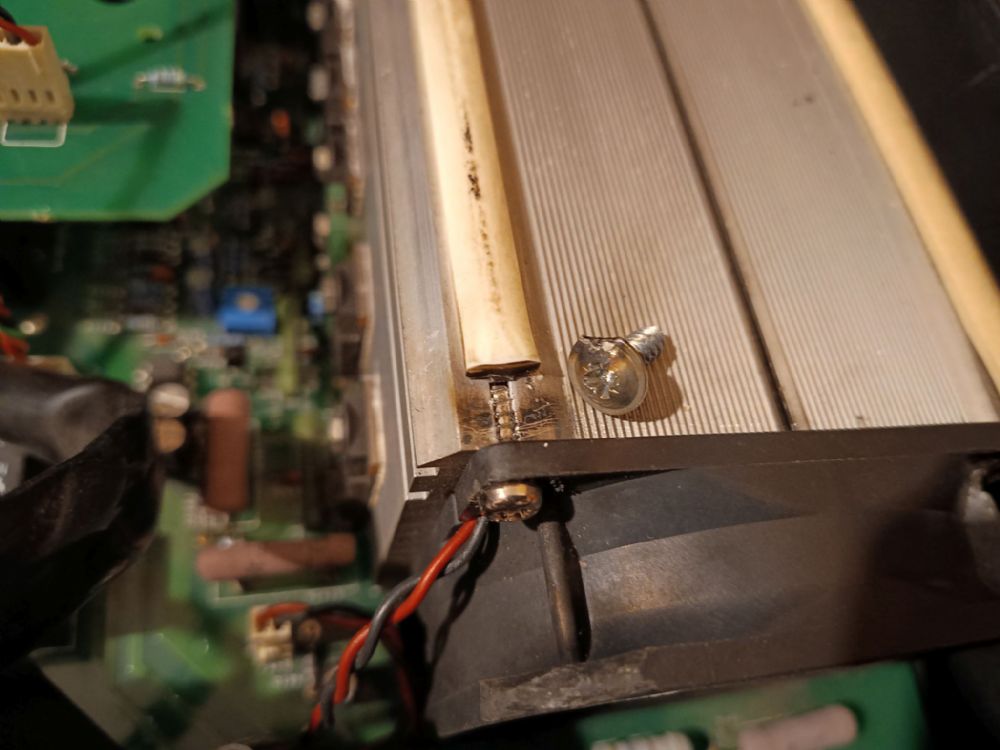 I would add to be careful with the diameter of the mounting screws. The screws are mounted on the heatsink which is at the rail voltage and is very close to the lid. I have a T2000 that when bought, the screw shorted to the lid which resulted in a lot of sparks as the screw flange burnt away -Thankfully with no long term damage to the amp!
Edited by Xoc1 - 10 January 2026 at 11:16pm |
|
|
|
|
jblfreak
Registered User
Joined: 03 March 2016 Status: Offline Points: 63 |
Post Options
Thanks(0)
Quote Reply
Posted: 10 January 2026 at 11:58pm |
|
Now that's a major oopsie moment, it wasnt't the original screw and butchered the fan too. Edited by jblfreak - 11 January 2026 at 12:12am |
|
|
|
|
kedwardsleisure
Old Croc
Joined: 20 January 2009 Location: Staffordshire Status: Offline Points: 5157 |
Post Options
Thanks(0)
Quote Reply
Posted: 11 January 2026 at 7:05pm |
|
I would urge going for industrial grade fans rather than those peddled for computer use. So NMB, Papst, Sanyo-Denki, Comair Rotron, Xinruilian Xfan, Micronel, Etri, Zeihl-Abegg, Panaflow, Mitsubishi, Nidec, not cheap unbranded things rebadged by computer-part distributors and sold as the next best thing for gaming prowess.
Edited by kedwardsleisure - 11 January 2026 at 7:06pm |
|
|
Kevin
North Staffordshire |
|
|
|
|
jblfreak
Registered User
Joined: 03 March 2016 Status: Offline Points: 63 |
Post Options
Thanks(0)
Quote Reply
Posted: 11 January 2026 at 7:20pm |
|
200% agree, however it's mostly in the use case. For any kind of touring / high power usage I'd always say leave the original fans alone unless defective and there are indeed a few names like NMB, Papst, Sanyo-Denki, Panaflow and the others you mentioned. Some designer thought about it and they chose that fan for a reason. These are fans meant to take a beating and run thousands of hours. However, in this case we're talking about written off, 20 year old amps that end up in their (retirement) homes ;) That said, brands like Arctic Cooling have been making their own fans for ages and I've seen them factory mounted in amps where background noise was a problem (studio's, home theater etc.). I've had an MC2 S800 (studio model) that was said to be factory fitted with Arctic F8's and considering the fans had cabling fitting exactly the plug on the PCB and not the usual 3-pin fan plug with tacho signal as used in computers, it was probably a factory fit indeed. There is also Noctua that in my opinion is above the industrial brands in terms of quality, but as mentioned - it's all in a use case and bit like an apples vs oranges comparison, the computer fans simply have much weaker motors.
Edited by jblfreak - 11 January 2026 at 7:38pm |
|
|
|
|
jblfreak
Registered User
Joined: 03 March 2016 Status: Offline Points: 63 |
Post Options
Thanks(0)
Quote Reply
Posted: 11 January 2026 at 10:59pm |
|
Got the T1500 fitted with P8 Silent fans, the original 3 pin connector fits fine over the 2 pin connector on the mainbord and sits snug. You must remove the 12V and GND wires from the original fan connector and swap their position as the polarity on the PCB fan connector is reversed. The tacho bit just remains floating. Highly recommended to file a bit of plastic away around the screw hole on the fan so the serrated ring under the screw doesn't stick out at the top:  The P8 Silent fans are inaudible but at startup voltage don't move that much air - as long as they move air from the tunnel of the heatsink, it should be fine. Without the top cover, the heatsink temp was about 36*C after an hour. With the cover on, the amp is blowing just lukewarm air out at the rear. I forgot and put my hand on the heatsink to check how warm it was and the bastard bit me, not recommended   Also don't ever ever touch these elevated green resistors, they run at 160*C, all of them. The manual of T-series doesn't say how the fan speed is adjusted, whether it's smoothly changing depending on temperature or in steps (per 10-15*C, for example), hope MC2 can say more about it. Next step for tomorrow would be removing the transformer and put a sheet of rubber to lower the hum. Another point would be - for home use just get the T2000. Runs cooler, quieter, has dual transformers and only has a fan at the front of each heatsink. Edited by jblfreak - 11 January 2026 at 11:19pm |
|
|
|
|
Post Reply
|
Page 12> |
| Tweet |
| Forum Jump | Forum Permissions You cannot post new topics in this forum You cannot reply to topics in this forum You cannot delete your posts in this forum You cannot edit your posts in this forum You cannot create polls in this forum You cannot vote in polls in this forum |


 Topic Options