dcx to laptop lead
Printed From: Speakerplans.com
Category: General
Forum Name: Electro Frying Forum
Forum Description: Talk about drivers, processors and mixers
URL: https://forum.speakerplans.com/forum_posts.asp?TID=76107
Printed Date: 26 March 2026 at 10:04pm
Software Version: Web Wiz Forums 12.08 - https://www.webwizforums.com
Topic: dcx to laptop lead
Posted By: Aaronski
Subject: dcx to laptop lead
Date Posted: 10 February 2013 at 4:16pm
|
hello i want to connect a berry dcx to my laptop it says to use a RS-232 lead, but my latop doesnt have a rs-232 connection is there a converter lead or something available? cheers  ------------- corr that sounds well good, how many k is it pushin? what amps you got? turn it up abit mate. |
Replies:
Posted By: APW
Date Posted: 10 February 2013 at 4:36pm
|
Something like this should work http://www.amazon.co.uk/USB-RS232-Converter-Cable/dp/B00077DJIQ/ref=cm_cr_pr_product_top |
Posted By: slaz
Date Posted: 10 February 2013 at 5:17pm
It very likely won't. But this will :- http://www.amazon.co.uk/dp/B0000VYJRY/?tag=hydra0b-21&hvadid=9550942989&ref=asc_df_B0000VYJRY ------------- REMEMBER....POLITICIANS AND DIAPERS SHOULD BE CHANGED OFTEN AND FOR THE SAME REASON |
 APW wrote:
Posted By: APW
Date Posted: 13 February 2013 at 1:33pm
|
I have used the USB to RS232 in the link I posted for numerous applications and never had any issues. Amazon seem to ship two different version of the lead, one uses the Prolific drivers and the other uses an installer package called 'CH341SER.exe', this is sometimes supplied on disk with the lead but more often that not you need to google 'CH341SER.exe' and download it from the manufactures web page 'http://www.wch.cn/download/.....', Once the driver is installed the the lead works fine. |
Posted By: slaz
Date Posted: 13 February 2013 at 8:00pm
AFAIK the very cheap adapters are designed to work primarily with olde worlde modems and terminals .... but not with every type of RS232-equipped device. Some applications need to communicate with a real hardware UART (16550 usually ISTR) Remember the introduction of AC97 audio and modems on PC motherboards ? These used the main CPU (and/or bits of the south brdige ?) to emulate some of the reqd. functionality ..... Well AFAIK its similar with the very cheap USB->RS232 adapters, and if the app is written to address a real serial port it just doesn't work with an emulated (or partly emulated) port. The Keyspan branded ones I mentioned have a real hardware UART - hence the relative cost. ------------- REMEMBER....POLITICIANS AND DIAPERS SHOULD BE CHANGED OFTEN AND FOR THE SAME REASON |
Posted By: shagnasty
Date Posted: 14 February 2013 at 12:59am
|
TBH Get a laptop with an RS-232, you look like a burk with the wrong tools, make sure whatever junk you buy has hardware flow control, most USB > RS-232 don't and will brick a DCK on a firmware flash... The reason Apple has no place in pro Audio is no RS-232, just get a shit box dell or tosh or IBM with a proper connector and use it for just that.... |
Posted By: levyte357-
Date Posted: 14 February 2013 at 1:50am
Was nice knowing you, SH.  ------------- Global Depopulation - Alive and Killing. |
Posted By: slaz
Date Posted: 14 February 2013 at 9:48am
+1 .... Can't see why some people just don't seem to get that. Got a Dell PIII-M 1.2GHz laptop here ... 12" XGA screen, 1GB RAM, 20GB disk, solid build quality, reliable ....... and has a proper serial port. Up for grabs for slightly more than the price of the keyspan adapter I linked to. (am I allowed to say that ?) .... If it gets nicked/smashed/beer spillage .... well you'd likely just suck your teeth a bit .... what if that happens to your dual-core 4GB jobby ? ------------- REMEMBER....POLITICIANS AND DIAPERS SHOULD BE CHANGED OFTEN AND FOR THE SAME REASON |
Posted By: colinmono
Date Posted: 14 February 2013 at 11:59am
+2 Good advice, got myself a £100 Dell laptop from ebay which is dedicated to rig use, no qualms about leaving it hooked up unattended. Having said that if you just want to mess around at home I can confirm these work: http://www.easysync-ltd.com/product/526/es-u-1001-r10.html" rel="nofollow - http://www.easysync-ltd.com/product/526/es-u-1001-r10.html |
Posted By: slaz
Date Posted: 14 February 2013 at 12:28pm
oo yes .... those look the nuts with proper specs and documentation etc. Huge range of cable lengths etc. too .... why doesn't Behringer ship one of these as standard with new machines fer gawds sake ? Or indeed build one internally into the machine (with their own device ID programmed in) terminating in a USB type B socket on the panel ? I suppose max USB cable length could be an issue. ------------- REMEMBER....POLITICIANS AND DIAPERS SHOULD BE CHANGED OFTEN AND FOR THE SAME REASON |
Posted By: shagnasty
Date Posted: 14 February 2013 at 12:43pm
|
USB is not a useful interface for audio processors, limited length, under windows tends to appear on random ports, and TBH if you don't know how to plumb into an RS-232/485 line you probably shouldn't be accessing the kit anyways. The real question is why don't they put a web-kit system in so you can hit up the units over TCP/IP even crappy Apples have ethernet!!! Oh, no my mistake, they don't anymore.....
 |
Posted By: DiscernAudio
Date Posted: 21 October 2013 at 7:04pm
|
Which of these would work ? http://www.ftdichip.com/Products/Cables/USBRS232.htm |
Posted By: DiscernAudio
Date Posted: 21 October 2013 at 7:15pm
|
Or what about this wired to ethernet for the RS485 input.... http://www.ftdichip.com/Products/Cables/USBRS485.htm |
Posted By: Teunos
Date Posted: 21 October 2013 at 7:34pm
|
I personally use a generic USB>RS232 adapter by farnell. I have a 4 pole XLR (to prevent accidental 3pole XLR to be inserted and have specific 4>3 pole leads) in my racks on stage and run it through a standard XLR or through the Multi down to FOH. I use pin 2,3 and 5 for this and link pin 6 and 7 on both sides of the RS232 connector. This however only gives support for 1 DCX because accessing multiple units with the RS485 link requires a full handshake. Also this means that if i setup stage Left on one DCX, i have to save the file to my desktop, then switch XLR lead to stage Right, connect and then upload the current setting. For me however this is more than adequate. And trust the people on here, you do NOT want to flash a DCX through a USB adapter. That is why i always keep an old Dell inspiron at hand. ------------- Best regards, Teun. |
Posted By: DiscernAudio
Date Posted: 21 October 2013 at 11:07pm
Like this...?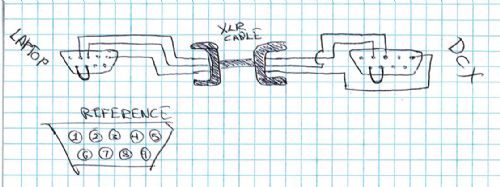 What does shorting 6 & 7 do?... 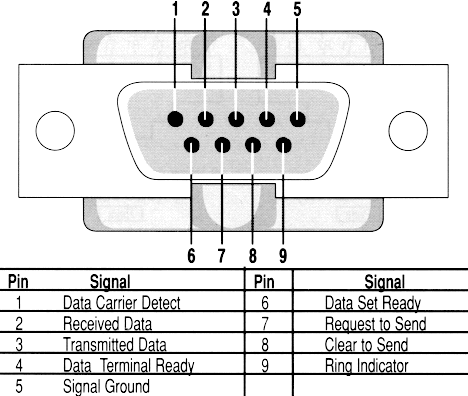 |
Posted By: shagnasty
Date Posted: 21 October 2013 at 11:20pm
|
The jump is prob cts to rts which is clear to send and ready to send, let the PC send data without host intervention, hence the previous comment about lack of full hanshake and RS-485 pass through and firmware flash!!! :) |
Posted By: DiscernAudio
Date Posted: 21 October 2013 at 11:32pm
|
Ithoguht CTS to RTS would make more sense, but Tuenos said 6&7 ?? |
Posted By: DiscernAudio
Date Posted: 21 October 2013 at 11:35pm
|
Also, any help greatly appreciated in selecting the correct USB<>RS232 adapter. The link below (from the FTDI chip conpany) shows them have several adapters each seeming as if it has a different chip in it. http://www.ftdichip.com/Products/Cables/USBRS232.htm |
Posted By: Teunos
Date Posted: 22 October 2013 at 9:37am
|
Sorry, just checked it, the 6&7 was from memory but indeed it has to be 7&8 RTS and CTS. ------------- Best regards, Teun. |
Posted By: DiscernAudio
Date Posted: 22 October 2013 at 4:46pm
|
Thanks, I just wanted to know for future use when I begin to move my mixer away from my amp rack. Right now, Im just going to try UB<>RS232 direct from lappy to DCX. But still confused by the options here... http://www.ftdichip.com/Products/Cables/USBRS232.htm |
Posted By: colinmono
Date Posted: 25 October 2013 at 9:50am
I have the "US232R-10 Premium USB-Serial Converter" from ftdichip.com, I used to use it with a Mac + Windows under VMWare successfully with the DCX so I imagine it would work with any PC too. For gigs I use a dedicated old Dell PC laptop which has a serial port. |