Explorer.exe using high CPU when opened
Printed From: Speakerplans.com
Category: Other Chat
Forum Name: Computer Talk
Forum Description: Help and discussion about your manly PC or girly Mac
URL: https://forum.speakerplans.com/forum_posts.asp?TID=88172
Printed Date: 27 March 2026 at 3:28am
Software Version: Web Wiz Forums 12.08 - https://www.webwizforums.com
Topic: Explorer.exe using high CPU when opened
Posted By: Adam_Iron_Horse
Subject: Explorer.exe using high CPU when opened
Date Posted: 14 August 2014 at 3:01pm
|
My laptops been running pretty slowly recently and I've realised everytime i've opened explorer.exe its gots up to about 50% sometimes up to 80/90%. My Dad suggested that I should do a disk de-frag but I had forgotten that i have a scheduled disk de-frag every wednesday at 1AM and according to the analyse it is 0% fragmented. Had a look around but couldn't find anything useful online and not really sure what I should be looking for. Any help? Heres the specs of it. 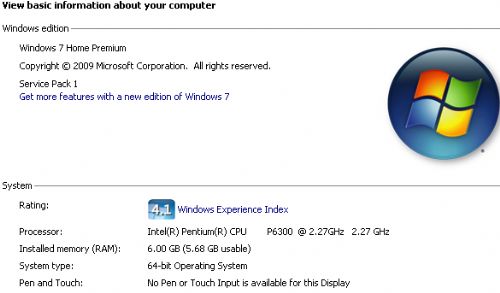 ------------- Kryptonik Sound Kollective www.facebook.com/kryptoniksoundkollective |
Replies:
Posted By: kr1sounds
Date Posted: 14 August 2014 at 3:03pm
|
had the same problem so i went to google chrome ------------- I MAN SERVE SELASSIE CONTINUALLY... NO MATTER WHAT THE WEAK HEART SAY fostonshfs.webs.com |
Posted By: Adam_Iron_Horse
Date Posted: 14 August 2014 at 3:06pm
|
Not talking about internet explorer, already on chrome. explorer.exe is the user interface for windows, file browser etc. ------------- Kryptonik Sound Kollective www.facebook.com/kryptoniksoundkollective |
Posted By: soundchippy
Date Posted: 16 August 2014 at 8:10pm
|
I don't really know what the problem might be but I would make sure pc is fully updated and run ccleaner and see if it helps any |
Posted By: mini-mad
Date Posted: 16 August 2014 at 9:42pm
|
Sounds like 1 of the back ground services is going ape sh!t making explorer.exe go into overtime!. Hard to pinpoint without sweeping the system... ------------- If it sounds like a gorilla is trying to escape, turn it down. |
Posted By: bitSmasher
Date Posted: 18 August 2014 at 2:37am

|
Posted By: Adam_Iron_Horse
Date Posted: 18 August 2014 at 11:16pm
|
Still not figured this out, tried ccleaner and nothing really happened... Might just send it to the warranty folks see if they can sort it out. ------------- Kryptonik Sound Kollective www.facebook.com/kryptoniksoundkollective |
Posted By: mini-mad
Date Posted: 18 August 2014 at 11:19pm
|
The "warranty folk" tend to just reinstall and send it back to you... ------------- If it sounds like a gorilla is trying to escape, turn it down. |
Posted By: audiomik
Date Posted: 19 August 2014 at 2:01am
|
Have a read of this article: http://www.theregister.co.uk/2014/08/17/remond_cries_uninstall_in_the_wake_of_blue_screens_of_death/ Might be related to what you are experiencing? Mik ------------- Warning! May contain Nuts plus springs, washers, screws, etc, etc. |