
|
Fane scaled up |
Post Reply 
|
Page <12345 14> |
| Author | |
SBC 
Registered User 
Joined: 25 November 2010 Status: Offline Points: 1266 |
 Post Options Post Options
 Thanks(0) Thanks(0)
 Quote Reply Quote Reply
 Posted: 22 December 2012 at 11:09am Posted: 22 December 2012 at 11:09am |
|
if your using autocad, go to paper space (layout 1), select the box there, and stretch it to the extents of the paper. the dotted line will show your printable area. usually the paper size will be a4 default, but if not, you need to right click on the layout tab, and go to "page setup manager"
then double click in the box (viewport) and zoom in on the area you want. you can select specific scales on the drop down bottom right of screen. double click outside viewport to finish. then go to output ----> pdf -----> save to a place. or type plot, and there's usually an option to save as pdf instead of print. screen shots from autocad is not the way to keep plans legible.  p.s. you can also plot by just typing plot, whilst in model space. select "window" from the "what to print" drop down. select your window. select your scale, and then print to pdf.
Edited by SBC - 22 December 2012 at 11:13am |
|
|
F.T.S.S.
|
|
 |
|
|
mykey-
Old Croc 

Joined: 03 March 2010 Location: ID/UK Status: Offline Points: 6119 |
Post Options
Thanks(1)
Quote Reply
Posted: 22 December 2012 at 11:16am |
|
Cheers Saul
|
|
|
|
|
mykey-
Old Croc
Joined: 03 March 2010 Location: ID/UK Status: Offline Points: 6119 |
Post Options
Thanks(0)
Quote Reply
Posted: 22 December 2012 at 11:23am |
Edited by mykey- - 22 December 2012 at 11:45am |
|
|
|
|
mykey-
Old Croc
Joined: 03 March 2010 Location: ID/UK Status: Offline Points: 6119 |
Post Options
Thanks(0)
Quote Reply
Posted: 22 December 2012 at 11:47am |
|
|
|
|
|
soundchippy
Young Croc 
Joined: 09 September 2011 Location: Tavistock Status: Offline Points: 770 |
Post Options
Thanks(0)
Quote Reply
Posted: 22 December 2012 at 10:28pm |
|
If you fancy fowarding me the DWG i'll have a go at sorting it.
|
|
|
|
|
SBC
Registered User
Joined: 25 November 2010 Status: Offline Points: 1266 |
Post Options
Thanks(0)
Quote Reply
Posted: 22 December 2012 at 10:59pm |
|
a screen print being saved as a pdf isn't the same as an output from auto cad, if this is what is being done.
|
|
|
F.T.S.S.
|
|
|
|
|
mykey-
Old Croc
Joined: 03 March 2010 Location: ID/UK Status: Offline Points: 6119 |
Post Options
Thanks(0)
Quote Reply
Posted: 23 December 2012 at 5:37am |
|
No that's not what I'm doing
I'll get a screen shot of what autocad is saying |
|
|
|
|
mykey-
Old Croc
Joined: 03 March 2010 Location: ID/UK Status: Offline Points: 6119 |
Post Options
Thanks(0)
Quote Reply
Posted: 23 December 2012 at 5:49am |
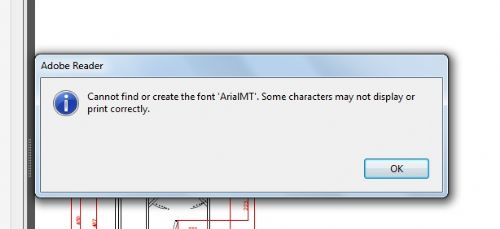 so the font used for the degree text is ArialIMT. I can't seem to change that font |
|
|
|
|
mykey-
Old Croc
Joined: 03 March 2010 Location: ID/UK Status: Offline Points: 6119 |
Post Options
Thanks(0)
Quote Reply
Posted: 23 December 2012 at 5:50am |
|
Upgrade Adobe?
|
|
|
|
|
SBC
Registered User
Joined: 25 November 2010 Status: Offline Points: 1266 |
Post Options
Thanks(0)
Quote Reply
Posted: 23 December 2012 at 1:20pm |
|
type command:
DIMSTYLE to change the dimension text type and several other parameters |
|
|
F.T.S.S.
|
|
|
|
|
mykey-
Old Croc
Joined: 03 March 2010 Location: ID/UK Status: Offline Points: 6119 |
Post Options
Thanks(0)
Quote Reply
Posted: 23 December 2012 at 3:00pm |
|
no been there many times. It won't change the font for the degree text
anyways, I'll sort it cheers |
|
|
|
|
bee
Old Croc

Joined: 14 June 2011 Location: Middlesex Status: Offline Points: 4549 |
Post Options
Thanks(0)
Quote Reply
Posted: 02 January 2013 at 1:27pm |
|
can u not just over lay the deg font in photoshop..... so save a jpg in cad, open in photoshop and add missing type.....
Edited by bee - 02 January 2013 at 2:48pm |
|
|
|
|
Post Reply
|
Page <12345 14> |
| Tweet |
| Forum Jump | Forum Permissions You cannot post new topics in this forum You cannot reply to topics in this forum You cannot delete your posts in this forum You cannot edit your posts in this forum You cannot create polls in this forum You cannot vote in polls in this forum |


 Topic Options
 soundchippy wrote: